SDWAN Multi-WAN (Load Balance & Failover)
Navigation: Scenarios → SDWAN Multi-WAN
Configure SDWAN → Multi-WAN to use two or more internet uplinks with weighted load balancing, priority-based failover, or a combination. Health probes (Ping / TCP / UDP) monitor each link; the firewall selects the active path per session based on Weight and Priority.
Network design
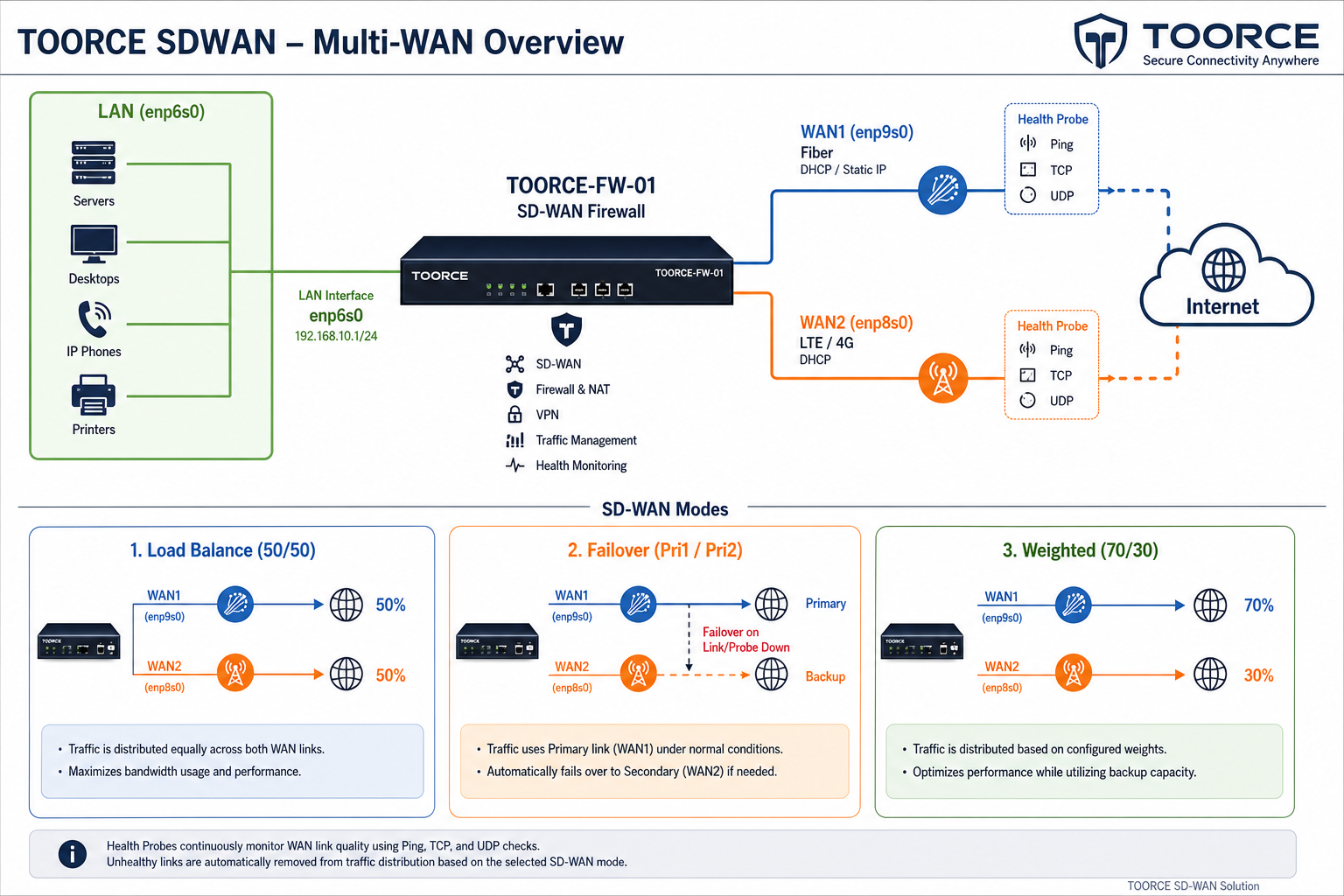
Figure 1 — Dual-WAN topology with load balance and failover modes
Reference topology
| Component | Interface | IP / gateway | Role |
|---|---|---|---|
| LAN | enp6s0 |
192.168.100.1/24 |
Internal clients |
| WAN1 (Primary) | enp9s0 |
GW 192.168.1.1 |
Fiber / primary ISP |
| WAN2 (Secondary) | enp8s0 |
GW 10.10.10.1 |
LTE / backup ISP |
Multi-WAN form — all fields explained
Go to SDWAN → Multi-WAN → + Add New (one record per WAN link).
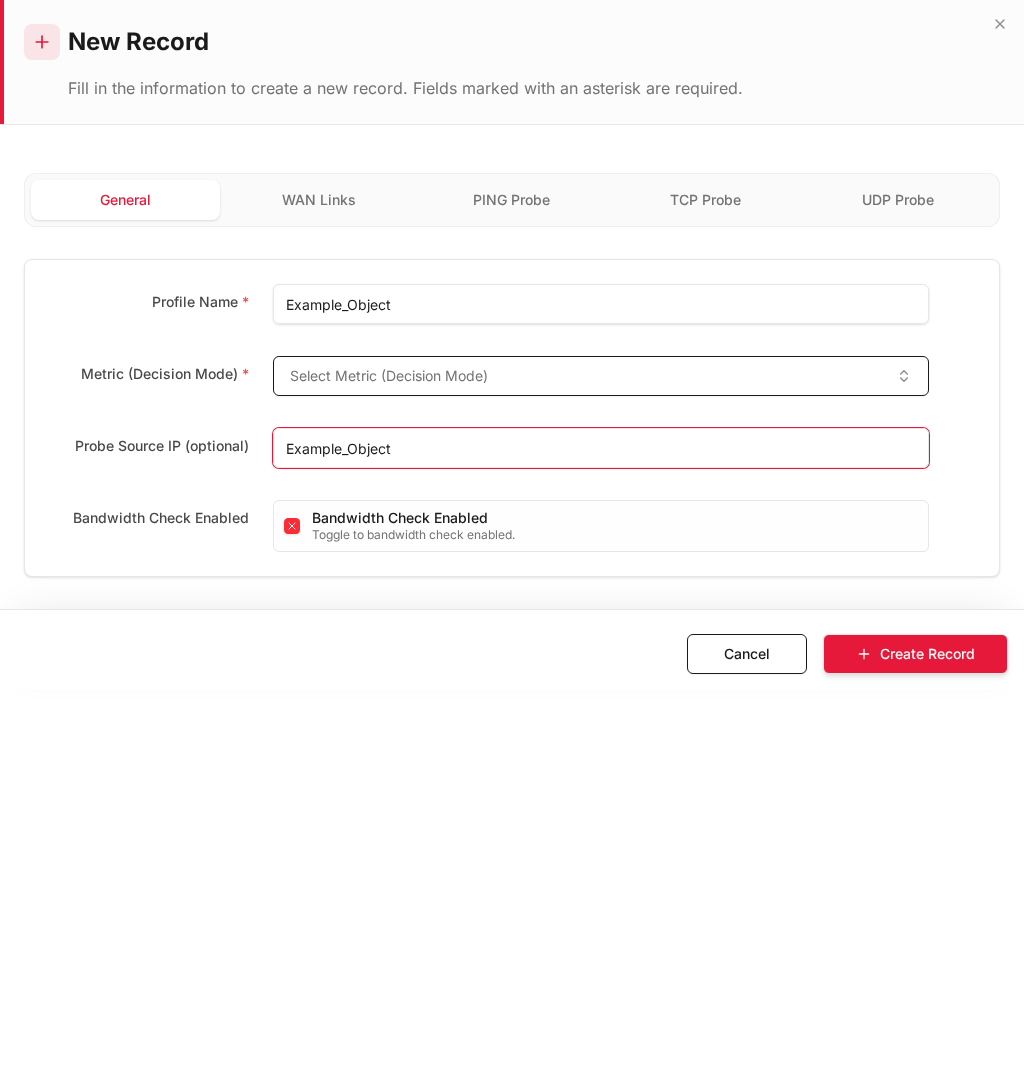
| Field | Required | Description | Example |
|---|---|---|---|
| Interface Name | Yes | Physical or PPPoE WAN interface | enp9s0, pp_enp9s0 |
| Gateway | Yes* | Next-hop router IP toward ISP | 192.168.1.1 (*empty for PPPoE) |
| Weight | Yes | Load-balance share — higher = more new sessions | 50, 70, 100 |
| Priority | Yes | Failover order — 1 = highest (preferred active link) | 1, 2 |
| Enabled | Yes | Include this link in the SDWAN group | Yes / No |
Health monitoring (link status)
The firewall probes each enabled link continuously. Status appears in Logs & Events → M-WAN Logs:
| Probe / column | Description |
|---|---|
| PING | ICMP echo to probe target (usually gateway or 8.8.8.8) |
| TCP | TCP connect probe to configured port |
| UDP | UDP probe response check |
| OVERALL | Combined health — UP or DOWN |
| ACTIVE LINK | Whether this link is currently carrying traffic |
| CHECKED AT | Timestamp of last probe |
| PROFILE | SDWAN profile / link group name |
| INTERFACE | WAN interface name |
| GATEWAY | Probe destination |
| ENABLED | Link administratively enabled |
| PRIORITY | Failover priority value |
| WEIGHT | Load-balance weight value |
A link marked DOWN in OVERALL is removed from load balancing and skipped in failover until probes recover.
Step 1 — Configure WAN interfaces
Before Multi-WAN, each uplink must exist under Network Settings → Interfaces:
| Interface | Address mode | Example |
|---|---|---|
enp9s0 |
DHCP or Static | Public IP from ISP1 |
enp8s0 |
DHCP or Static | Public IP from ISP2 |
See Network Interfaces.
Step 2 — Add Multi-WAN links
Go to SDWAN → Multi-WAN and add one row per WAN link.
Mode A — Equal load balance (50 / 50)
Distribute new sessions evenly across both healthy links.
Form values
| Interface | Gateway | Weight | Priority | Enabled |
|---|---|---|---|---|
enp9s0 |
192.168.1.1 |
50 | 1 | Yes |
enp8s0 |
10.10.10.1 |
50 | 1 | Yes |
How it works: Equal weights with the same priority → SDWAN engine splits new flows ~50% on each link. Existing sessions stay on the link they started on (stateful).
Packet flow
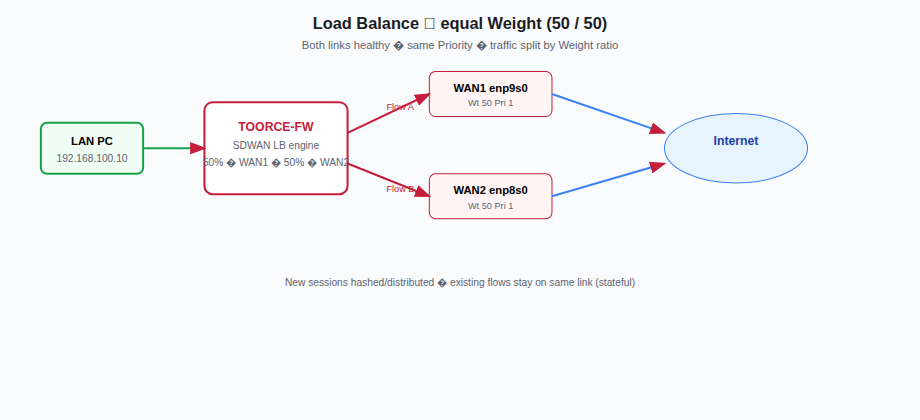
Figure 2 — Flow A and Flow B take different WAN paths
LAN PC ──► TOORCE-FW ──┬── 50% ──► WAN1 (enp9s0) ──► Internet
                       └── 50% ──► WAN2 (enp8s0) ──► Internet
Mode B — Failover (active / standby)
Use WAN1 only while healthy; switch all new traffic to WAN2 when WAN1 probes fail.
Form values
| Interface | Gateway | Weight | Priority | Enabled |
|---|---|---|---|---|
enp9s0 |
192.168.1.1 |
100 | 1 | Yes |
enp8s0 |
10.10.10.1 |
100 | 2 | Yes |
How it works: Priority 1 is the active link. When OVERALL = DOWN on WAN1, the firewall fails over to the next enabled link with Priority 2. WAN2 stays idle until needed.
Packet flow
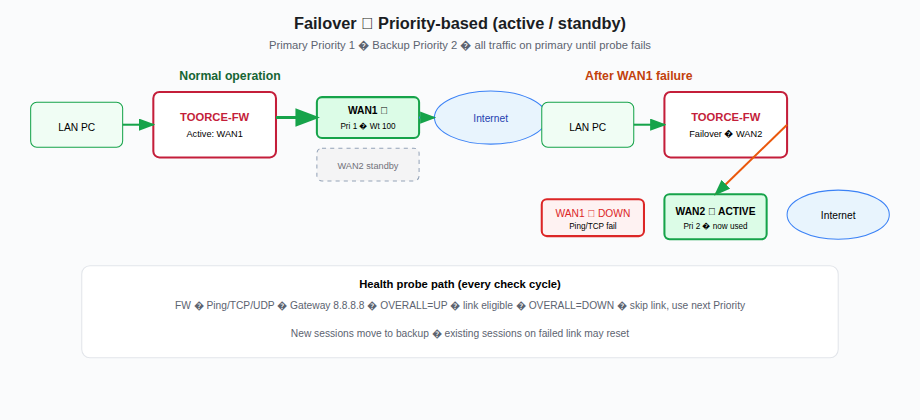
Figure 3 — Normal path on WAN1; automatic switch to WAN2 after probe failure
Normal:    LAN ──► FW ──► WAN1 (Pri 1) ──► Internet     WAN2 standby
Failover:  LAN ──► FW ──► WAN2 (Pri 2) ──► Internet     WAN1 DOWN
Verify failover events under M-WAN Logs → Failover Events tab.
Mode C — Weighted load balance (70 / 30)
Send most traffic on the faster/cheaper link but keep the second link active for extra capacity.
Form values
| Interface | Gateway | Weight | Priority | Enabled |
|---|---|---|---|---|
enp9s0 (Fiber) |
192.168.1.1 |
70 | 1 | Yes |
enp8s0 (LTE) |
10.10.10.1 |
30 | 2 | Yes |
Share calculation: 70 / (70+30) = 70% on WAN1 · 30 / (70+30) = 30% on WAN2
Packet flow
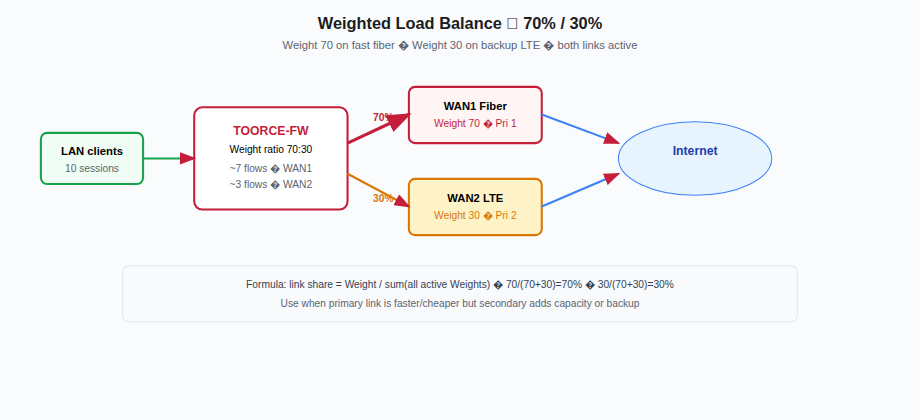
Figure 4 — Seven of ten new sessions on WAN1, three on WAN2
LAN ──► FW ──┬── 70% ──► WAN1 Fiber ──► Internet
             └── 30% ──► WAN2 LTE   ──► Internet
Mode D — Policy-based WAN (inline rule SDWAN profile)
Force specific traffic onto a chosen WAN link regardless of global weights.
- Create Multi-WAN links (Modes A–C above).
- Go to Rules & Policies → Inline Rules → + Add New.
- On NAT/SDWAN tab, select SDWAN Profile matching the desired link/profile.
- Example:
Force_VoIP_WAN1rule → SDWAN profile bound toenp9s0only.
| Use case | SDWAN profile selection |
|---|---|
| VoIP on stable fiber | Profile using WAN1 only |
| Guest Wi-Fi on cheap LTE | Profile using WAN2 only |
| Default internet | No SDWAN profile (use global Multi-WAN group) |
Step 3 — Default route and NAT
Ensure LAN traffic can exit via SDWAN:
- Default route
0.0.0.0/0via SDWAN-managed gateways (or per-link routes). - Inline rule with SNAT — see NAT Gateway.
| Rule | Source | Destination | NAT |
|---|---|---|---|
LAN_Internet_SDWAN |
LAN | Any | SNAT outgoing interface |
Step 4 — Verify and monitor
| Check | Location | Expected |
|---|---|---|
| Link health | M-WAN Logs → Link Status | PING/TCP/UDP UP, OVERALL UP |
| Active link | ACTIVE LINK column | Matches expected mode |
| Load split | Firewall logs / traffic stats | ~50/50 or 70/30 by mode |
| Failover test | Disconnect WAN1 cable | WAN2 becomes ACTIVE LINK |
| Failback | Restore WAN1 | Traffic returns per Priority/Weight config |
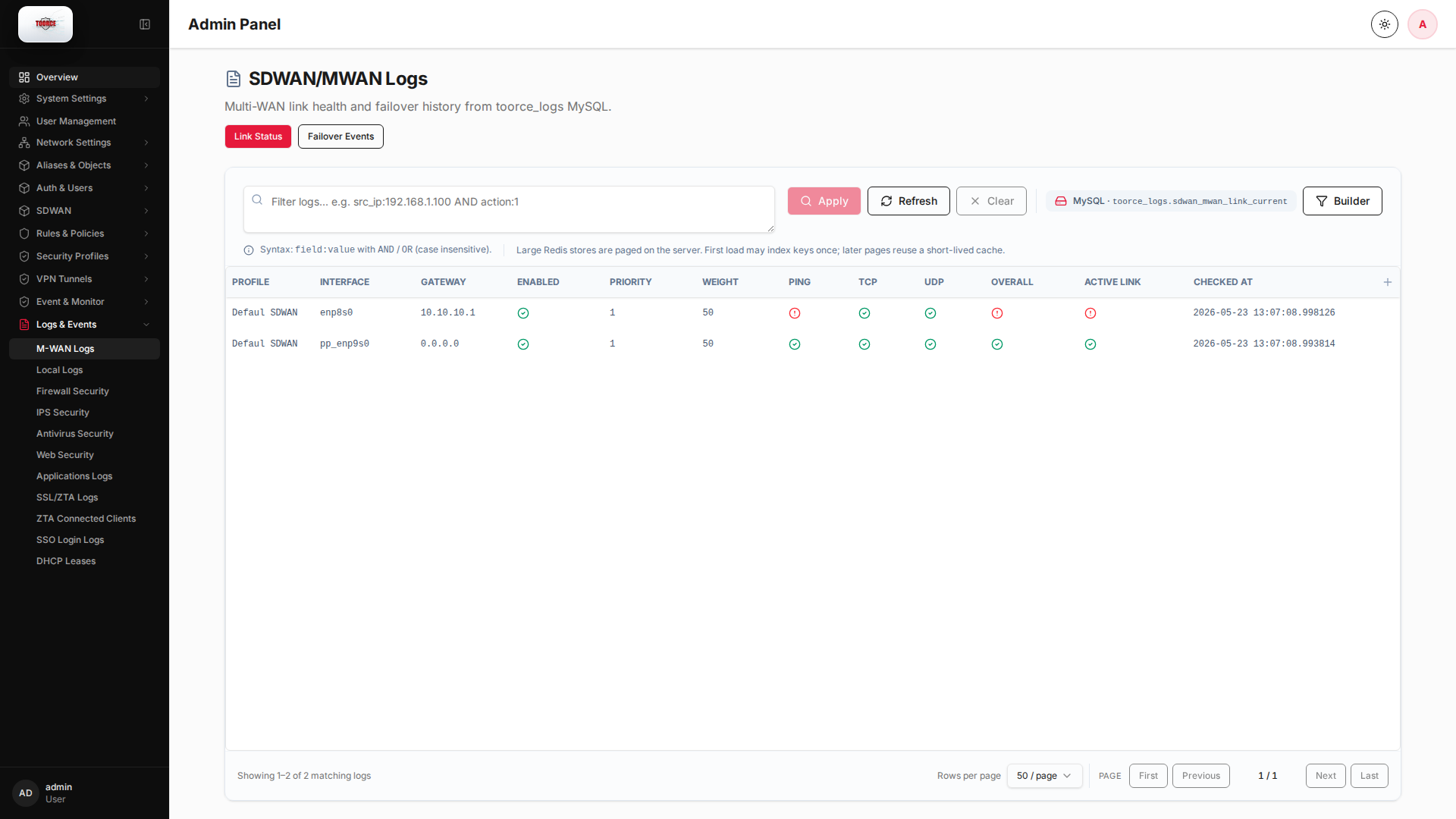
Monitor link status, PING/TCP/UDP probes, OVERALL health, and ACTIVE LINK in Logs & Events → M-WAN Logs.
Mode comparison summary
| Mode | Weight setup | Priority setup | Packet behaviour |
|---|---|---|---|
| Equal load balance | Equal (50/50) | Same (both 1) | Split new sessions across links |
| Failover | Any (often 100/100) | Different (1, 2) | All traffic on Pri 1 until down |
| Weighted balance | Unequal (70/30) | Any | Proportional split by weight ratio |
| Policy-based | Per profile | Per rule SDWAN field | Selected flows forced to one WAN |
Troubleshooting
| Symptom | Cause | Fix |
|---|---|---|
| All traffic on one WAN | Weights 100/0 or Pri 1 only active | Adjust Weight/Priority |
| No failover | Backup link Disabled or probes pass on dead GW | Enable WAN2; fix probe target |
| Uneven split | Weights not equal / hash skew on few flows | Test with many sessions |
| Link flapping | Unstable probe target | Probe gateway IP not ISP DNS |
| SDWAN rule ignored | Wrong SDWAN profile on inline rule | Match profile name to link group |