X-Pool NAT — Overlapping Networks
Navigation: Scenarios → X-Pool Overlapping NAT
Connect two sites that use the same IP subnet (for example, both use 192.168.1.0/24) without routing conflicts. TOORCE uses an X-Pool (NAT address pool) to translate addresses:
| Traffic direction |
NAT type |
Purpose |
| Established from local LAN → remote |
SNAT (X-Pool) |
Rewrite local source IPs to a unique pool (10.255.1.0/24) so the remote site can reply |
| Initiated from remote network → local |
DNAT (X-Pool) |
Map virtual pool addresses (10.255.2.0/24) to real local hosts |
Network design
Both sites use 192.168.1.0/24. Without NAT, routing cannot distinguish 192.168.1.10 (local) from 192.168.1.50 (remote). The firewall breaks the overlap using two non-overlapping translation pools.
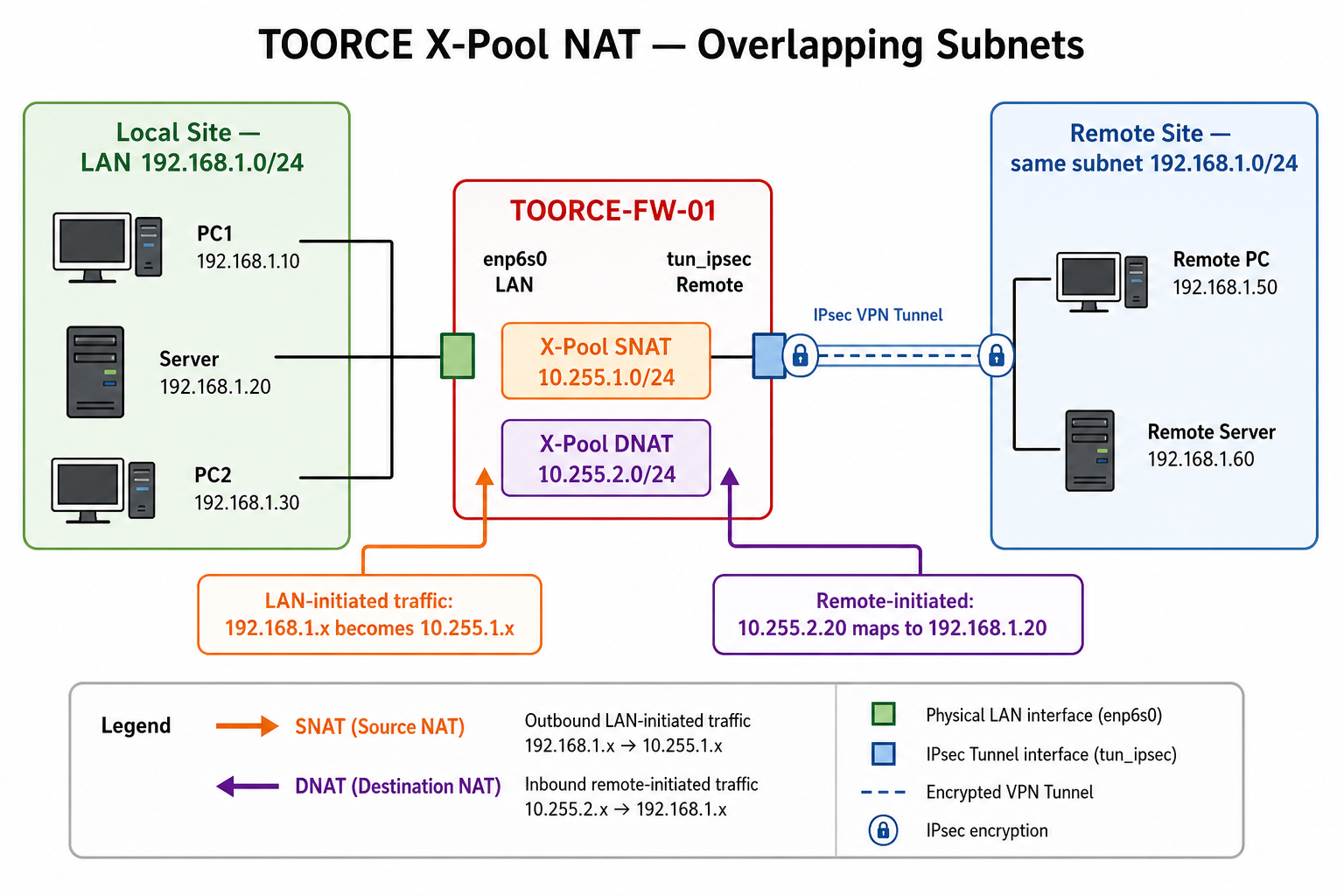
Figure 1 — Overlapping subnet design with X-Pool SNAT and DNAT
Addressing summary
| Zone |
Network |
Example host |
Seen by remote as |
| Local LAN |
192.168.1.0/24 |
192.168.1.10 |
10.255.1.10 (after SNAT) |
| Local LAN |
192.168.1.0/24 |
192.168.1.20 |
10.255.1.20 (after SNAT) |
| X-Pool SNAT |
10.255.1.0/24 |
Pool for outbound |
Source address on VPN |
| X-Pool DNAT |
10.255.2.0/24 |
10.255.2.20 → 192.168.1.20 |
Virtual IP remote dials |
| Remote LAN |
192.168.1.0/24 |
192.168.1.50 |
(unchanged on remote side) |
Traffic flows
LAN-initiated (SNAT):
  PC 192.168.1.10 → Remote 192.168.1.50
  Firewall rewrites source: 10.255.1.10 → 192.168.1.50
  Return traffic: 192.168.1.50 → 10.255.1.10 → de-NAT → 192.168.1.10

Remote-initiated (DNAT):
  Remote 192.168.1.50 → Virtual 10.255.2.20
  Firewall rewrites destination: → 192.168.1.20 (local server)
  Return traffic: 192.168.1.20 → SNAT pool as needed
Prerequisites
- IPSec VPN or private link between sites (tunnel interface up)
- Agreed X-Pool ranges with the remote administrator (must not overlap either site's real subnets)
- Address objects created before rules
Step 1 — Create address objects
Go to Aliases & Objects → Address and create:
| Object name |
Type |
Value |
Used for |
Local_LAN |
Network |
192.168.1.0/24 |
Local real subnet |
Remote_LAN |
Network |
192.168.1.0/24 |
Remote subnet (same CIDR) |
XPool_SNAT |
Range or Network |
10.255.1.1 – 10.255.1.254 |
Outbound source translation |
XPool_DNAT |
Range or Network |
10.255.2.1 – 10.255.2.254 |
Inbound virtual destinations |
Local_Server |
Host |
192.168.1.20 |
DNAT target example |
Share the 10.255.1.0/24 and 10.255.2.0/24 pools with the remote site so their firewall can route replies correctly.
Step 2 — Configure interfaces
LAN interface (enp6s0)
| Field |
Value |
| Alias |
LAN |
| Zone |
LAN |
| IP Address |
192.168.1.1/24 |
VPN / remote interface (tun_ipsec or WAN)
Ensure the tunnel to the remote site is up and carries traffic for the remote 192.168.1.0/24.
| Field |
Value |
| Alias |
Remote_VPN |
| Zone |
VPN or WAN |
| Status |
Enabled |
See Network Interfaces and IPSec VPN.
Step 3 — Add static route to remote site
Even with overlapping subnets, the firewall needs to know that remote 192.168.1.0/24 is reached via the VPN — not the local LAN.
- Go to Network Settings → Static Routs.
- Click + Add New:
| Field |
Value |
| Route Name |
Route_Remote_Overlap |
| Destination |
192.168.1.0/24 |
| Gateway |
Remote VPN peer inner IP, e.g. 10.0.0.2 |
| Outgoing Interface |
tun_ipsec (VPN) |
| Metric |
10 (higher than local connected route) |
Local 192.168.1.0/24 stays on enp6s0. The static route sends remote traffic for the same CIDR out the tunnel. Policy-based routing or more specific host routes may be required in complex designs.
Step 4 — Inline rule: LAN → Remote with X-Pool SNAT
For traffic established from the local LAN toward the remote network:
- Go to Rules & Policies → Inline Rules → + Add New.
General
| Field |
Value |
| Rule Name |
LAN_to_Remote_XPool_SNAT |
| Action |
Allow |
| Status |
Enabled |
Interfaces
| Field |
Value |
| Source Interface |
enp6s0 (LAN) |
| Destination Interface |
tun_ipsec (VPN) |
Source / Destination
| Field |
Value |
| Source Address |
Local_LAN (192.168.1.0/24) |
| Destination Address |
Remote_LAN (192.168.1.0/24) |
| Service |
Any (or restrict as needed) |
NAT/SDWAN tab
| Field |
Value |
| Enable SNAT |
Enabled |
| NAT type |
Source NAT |
| Translated source |
X-Pool / Address pool |
| X-Pool / Pool object |
XPool_SNAT (10.255.1.0/24) |
| Translation mode |
Dynamic (per-session from pool) |
Remote hosts see your LAN PCs as 10.255.1.x, not 192.168.1.x.
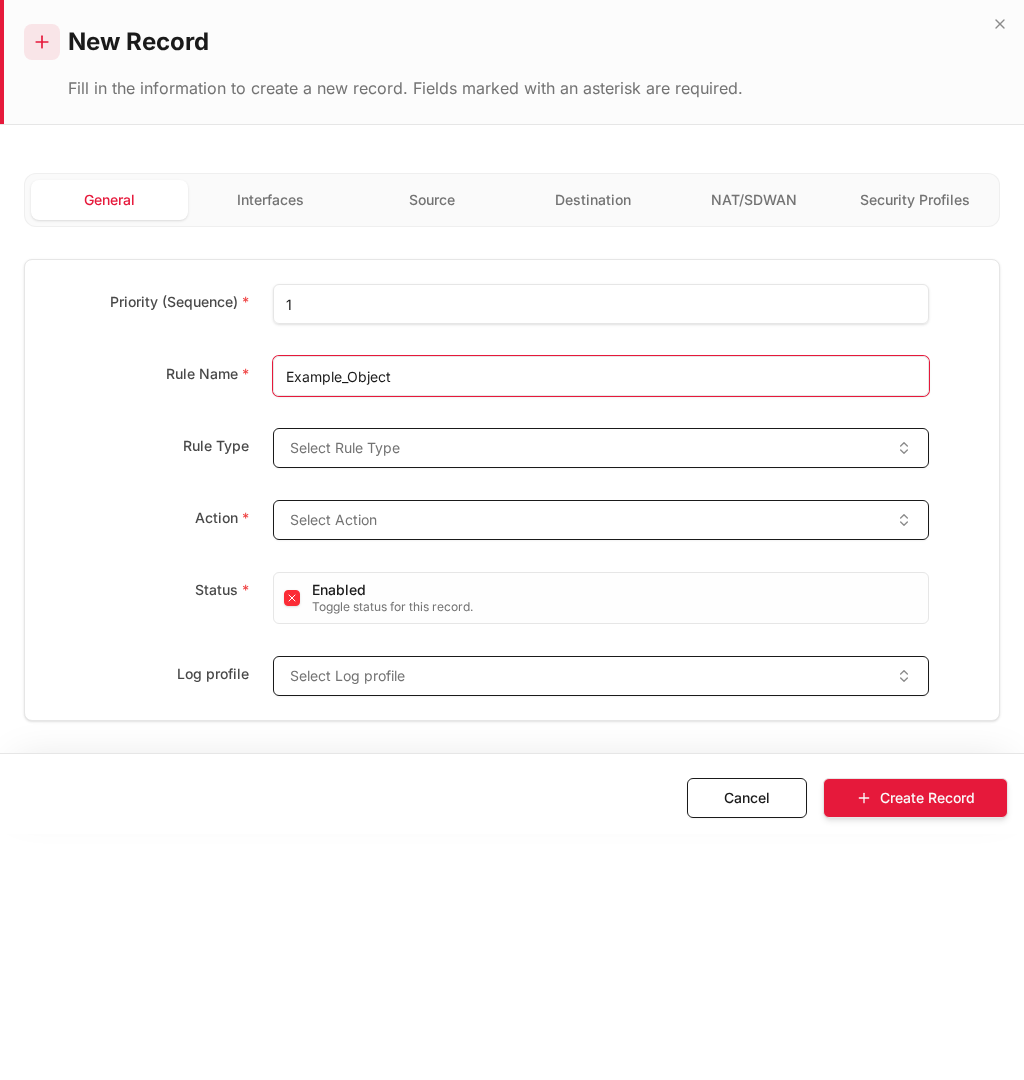
Step 5 — Inline rule: Remote → Local with X-Pool DNAT
For traffic initiated from the remote network toward local services:
- Click + Add New (place this rule above the SNAT rule if you use host-specific DNAT).
General
| Field |
Value |
| Rule Name |
Remote_to_Local_XPool_DNAT |
| Action |
Allow |
| Status |
Enabled |
Interfaces
| Field |
Value |
| Source Interface |
tun_ipsec (VPN) |
| Destination Interface |
enp6s0 (LAN) |
Source / Destination
| Field |
Value |
| Source Address |
Remote_LAN |
| Destination Address |
XPool_DNAT (10.255.2.0/24) or specific 10.255.2.20 |
| Service |
e.g. HTTPS, RDP as required |
NAT/SDWAN tab
| Field |
Value |
| Enable DNAT |
Enabled |
| NAT type |
Destination NAT |
| Translated destination |
Local_Server (192.168.1.20) |
| DNAT Policy |
Select matching DNAT policy if configured separately |
Example mapping table
| Remote dials (virtual) |
DNAT to (real local) |
Service |
10.255.2.20 |
192.168.1.20 |
HTTPS / app server |
10.255.2.30 |
192.168.1.30 |
RDP |
Tell remote users: "Connect to 10.255.2.20, not 192.168.1.20."
Step 6 — Install policy and verify
- Click Install Policy.
- Run checks:
| Test |
From |
To |
Expected |
| LAN → Remote |
192.168.1.10 |
192.168.1.50 |
Pass; remote sees source 10.255.1.10 |
| Remote → Local server |
Remote PC |
10.255.2.20 |
Pass; hits 192.168.1.20 |
| Wrong DNAT |
Remote PC |
192.168.1.20 directly |
Fail or no route (by design) |
| Logs |
Firewall Security |
— |
Rules LAN_to_Remote_XPool_SNAT / Remote_to_Local_XPool_DNAT |
Rule order recommendation
| Priority |
Rule |
NAT |
| 1 |
Remote_to_Local_XPool_DNAT |
DNAT for inbound |
| 2 |
LAN_to_Remote_XPool_SNAT |
SNAT for outbound |
| 3 |
Deny overlap leakage |
Block un-NATed cross-site traffic |
Design notes
- X-Pool ranges must be unique — do not use subnets that exist at either site or on the internet.
- Symmetric routing — remote site should route
10.255.1.0/24 and 10.255.2.0/24 back through the VPN tunnel.
- One-to-one vs many-to-one — use host-specific DNAT mappings for servers; use dynamic SNAT pool for many clients.
- DNS — applications that embed IP addresses may need FQDN or static host files on both sides.
Related topics