Architecture
Navigation: DNS Security → Architecture
TOORCE DNS Security sits between the internet and your local DNS server (Active Directory DNS or BIND). Client queries are inspected, validated, and logged on the firewall before recursive resolution continues.
Depending on traffic direction, TOORCE can transparently intercept and inspect DNS, or act as the resolver / forwarder in front of the local DNS server.
Network design
The diagram shows the recommended path: internet recursive resolution at the top, TOORCE DNS Security engines in the middle, then AD DNS / BIND, then local clients.
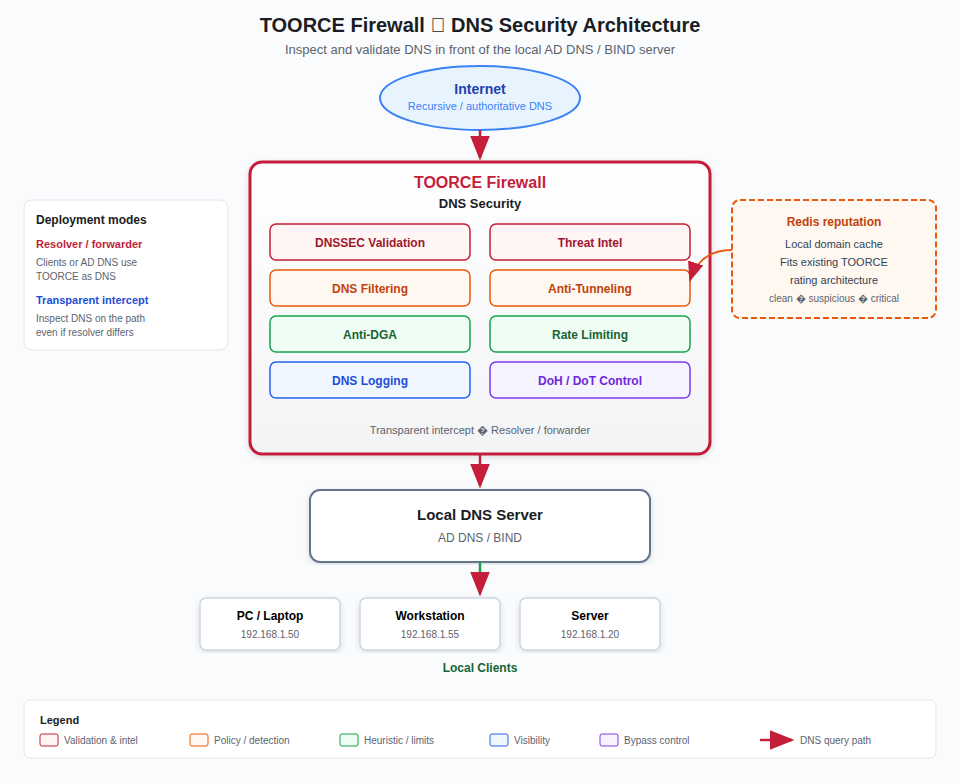
Figure 1 — TOORCE DNS Security in front of the local DNS server
Inspection engines
| Engine | Role |
|---|---|
| DNSSEC Validation | Authenticate signed answers (RRSIG, DNSKEY, DS) with automatic root trust-anchor / KSK rollover |
| Threat Intel | Match malware, phishing, C2, botnet, ransomware, and newly observed domains |
| DNS Filtering | Enforce category policy (adult, gambling, newly registered, dynamic DNS, and more) |
| Anti-Tunneling | Flag long/random labels, high query rates, excessive TXT, encoded payloads |
| Anti-DGA | Detect algorithmically generated names used by malware |
| Rate Limiting | Cap query floods, amplification, NXDOMAIN storms, and malformed packets |
| DNS Logging | Record client IP, FQDN, type, response, DNSSEC, category, reputation, action |
A Redis-backed domain reputation cache stores recent verdicts so repeated lookups do not wait on a remote rating call. This matches the existing TOORCE pattern used by AV custom signatures and URL rating.
Deployment modes
| Mode | How DNS reaches TOORCE | When to use |
|---|---|---|
| Resolver / forwarder | Clients (or AD DNS / BIND) use the firewall as their DNS server. TOORCE forwards allowed queries upstream. | Recommended. Policy cannot be skipped by pointing at another resolver on port 53. |
| Transparent intercept | TOORCE captures DNS on the path (UDP/TCP 53) even if the client still targets an internal or public resolver. | Useful when you cannot change every client or AD DNS forwarder immediately. |
Resolver / forwarder (recommended)
Local client
   →  Local DNS (AD DNS / BIND)   optional
   →  TOORCE Firewall (DNS Security)
   →  Internet recursive / authoritative servers
- Set DHCP DNS (or static client DNS) to the TOORCE LAN address, or set the AD DNS / BIND forwarder to TOORCE.
- Enable DNS Security engines and logging.
- Block outbound DNS from clients that bypass the firewall (see DoH/DoT Control).
Transparent intercept
Local client  →  any resolver (port 53)
                    │
                    ▼
              TOORCE intercept / inspect
                    │
                    ▼
              Upstream or local DNS
TOORCE evaluates the query, then forwards permitted traffic or returns a block response. Clients that switch to DoH or DoT still need DoH/DoT Control; those protocols do not use classic port 53.
Traffic direction
| Direction | Typical flow | TOORCE role |
|---|---|---|
| Client → internet | LAN host resolves a public name | Inspect, validate DNSSEC, apply threat/category policy, log |
| Client → local zone | Host resolves dc01.corp.local |
Allow or skip recursive engines; still log if enabled |
| Local DNS → internet | AD DNS / BIND forwards recursion | TOORCE is the forwarder; same inspection as client queries |
| Internet → LAN | Rare inbound DNS to an authoritative server | Rate-limit and drop amplification / malformed packets |
How a query is evaluated
1. Receive query (intercepted or as resolver)
2. Malformed / rate-limit / flood check
3. Local / private zone? → allow or skip recursive engines
4. Reputation cache (Redis) → reuse recent verdict
5. Threat intel + category filter
6. Anti-tunneling + Anti-DGA heuristics
7. Recurse / forward if allowed
8. DNSSEC validate signed answers
9. Log (src_ip, domain, qtype, dnssec, category, reputation, action, reason)
10. Return answer or block (sinkhole / NXDOMAIN / REFUSED)
Addressing summary
| Component | Example | Role |
|---|---|---|
| Internet / recursive DNS | Upstream resolvers | Public resolution after TOORCE allows the query |
| TOORCE Firewall | LAN 192.168.100.1 |
DNS Security engines + Redis reputation cache |
| Local DNS server | AD DNS / BIND 192.168.100.10 |
Internal zones; forwards recursion to TOORCE |
| Local clients | 192.168.100.0/24 |
DHCP DNS should point at TOORCE or the local DNS that forwards to TOORCE |
Prerequisites
- LAN and WAN interfaces configured (NAT Gateway or equivalent)
- System DNS on the appliance for firewall-originated lookups (General) — this is separate from client DNS Security
- Outbound DNS (UDP/TCP 53) allowed for TOORCE itself
- Clients or AD DNS / BIND using TOORCE as resolver/forwarder, or transparent intercept enabled
- Redis available on the appliance (same local cache architecture as other TOORCE rating features)
Recommended client DNS
| Client setting | Recommended value | Why |
|---|---|---|
| DHCP DNS | TOORCE LAN IP, or AD DNS that forwards to TOORCE | All lookups pass DNS Security |
| DoH / DoT on endpoints | Disabled or restricted | Prevents bypass of TOORCE policy |
| Public resolver (8.8.8.8) on clients | Blocked | Bypasses inspection unless intercept is on |
System DNS Server on System Settings → General is only for the firewall’s own lookups (updates, FQDN objects, SMTP). Client inspection is configured under DNS Security.